
Forms

OASIS ID

Users must have an OASIS account in order to access any campus system.

(Example: NHJOE)

Prior to submitting the Oasis logon ID request form both steps below must be completed.

  1. User must have a UCLA logon ID. It is a required field on the form. If not, please visit https://accounts.iam.ucla.edu/ to create one.
  2. User name must be added to Orion directory [campus directory]. Check whether user is on directory by looking them up here. If not, submit this form to semelhr@mednet.ucla.edu. System will sync overnight to reflect HR entry. Once added, it is required that screenshot of user’s name appearing in directory is provided on form [example below].
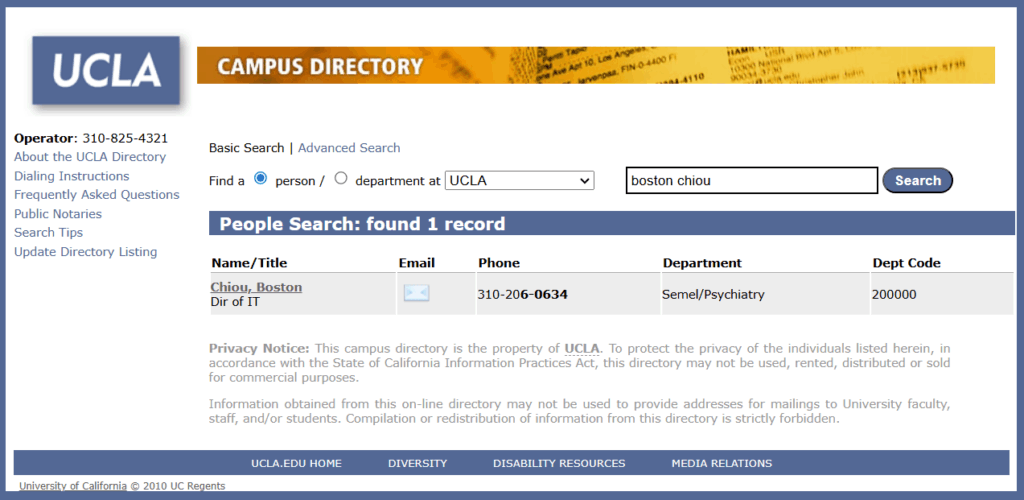
*When you have the UCLA logon ID and proof that they have been added to campus directory, please proceed to submit the Oasis logon ID request here.


Attention!

Applying for mednet vpn access?

Only supervisors/managers should complete this form!

Attention!

Applying for access request with no UCPath appointment?

Enter user's name.

Please SELECT ONE of the categories below that the user belongs to.

Note: If none of these apply to you, then you should not fill out this form.

For a definition of each category, hover over here!
CATEGORY DEFINITION
Affiliate A student or staff in non-UCLA Health department.
Contractor Meets BFB-BUS-77 Independent Consultant Guidelines https://policy.ucop.edu/doc/3220485/BFB-BUS-43 https://policy.ucop.edu/doc/3600670/Independent Contractor
Collaborator User who is a student or staff in other universities and is part of an IRB.
Intern User is not enrolled in any UC campus as student. Need access to participate in training or internship.
Volunteer Registered with UCLA Health Sciences Volunteer Program https://www.uclahealth.org/volunteer/ucla-health-sciences-volunteer-program

just making sure you're not a robot

Attention!

Applying for Research careconnect access?

Please contact Semel Research CareConnect at SemelResCon@mednet.ucla.edu.